SmugMug Release Notes: February 2026
Release notes

Share:



NO PURCHASE NECESSARY TO ATTEND MODE FESTIVAL. PURCHASE OF SMUGMUG PRO ANNUAL PLAN REQUIRED TO RECEIVE FREE TICKET UNDER THIS PROMOTION.
1. PROMOTION PERIOD The SmugMug x MODE Festival Free Ticket Promotion ("Promotion") begins on [February 27, 2026 at 12:00 AM Pacific Time and ends on [April 30, 2026] at 11:59 PM Pacific Time, or when all fifty (50) free tickets have been claimed, whichever occurs first ("Promotion Period").
2. ELIGIBILITY The Promotion is open to legal residents of the United States who are eighteen (18) years of age or older at the time of entry. Employees, officers, and directors of Awes.me, Inc., SmugMug, Inc., and their respective parent companies, subsidiaries, affiliates, advertising and promotion agencies, and any other entity involved in the development or administration of this Promotion, and their immediate family members and household members, are not eligible to participate.
3. HOW TO QUALIFY To receive a free MODE Festival ticket under this Promotion: (a) Visit [www.smugmug.com] during the Promotion Period; (b) Subscribe to a new SmugMug Pro Annual Plan at the then-current price; (c) Complete the subscription checkout process; (d) Within [5 business days] of completing your SmugMug Pro Annual subscription, you will receive a separate email with instructions and a unique link to claim your free MODE Festival ticket. Check your inbox and spam/junk folder for an email from MODE Festival.
Qualifying subscriptions must be completed during the Promotion Period. Upgrades from existing SmugMug plans do not qualify. Free trial conversions qualify only if the paid Pro Annual Plan subscription is completed during the Promotion Period.
4. FREE TICKET DETAILS Eligible participants will receive one (1) MODE Festival General Admission ticket (approximate retail value: $[440). The ticket is:
5. SUBSCRIPTION REQUIREMENT To remain eligible for the free ticket, participants must maintain an active SmugMug Pro Annual Plan subscription through September 20, 2026 (the final day of MODE Festival). If a participant cancels, downgrades, or fails to maintain their SmugMug Pro Annual Plan subscription prior to September 20, 2026, the free MODE Festival ticket will be automatically forfeited and the participant will not be entitled to any refund, credit, or compensation.
6. LIMIT Limit one (1) free ticket per person, per household, and per email address. Multiple subscriptions by the same person, household, or using the same email address will not result in additional free tickets.
7. AVAILABILITY Free tickets are available to the first fifty (50) qualifying subscribers only. Once all fifty (50) tickets have been claimed, this Promotion will end automatically, regardless of any advertised end date. Sponsor reserves the right to display a counter or other indicator of remaining tickets but is not obligated to do so.
8. TICKET DELIVERY Free tickets will be delivered electronically via the email address associated with the participant's SmugMug account. Participants are responsible for ensuring their email address is accurate and for checking spam/junk folders. Sponsor is not responsible for lost, misdirected, or undelivered emails.
9. GENERAL CONDITIONS By participating in this Promotion, participants agree to be bound by these Official Terms and Conditions and the decisions of Sponsor, which are final and binding in all respects. Sponsor reserves the right, in its sole discretion, to cancel, terminate, modify, or suspend the Promotion at any time for any reason. Sponsor reserves the right to disqualify any participant who tampers with the entry process or violates these Official Terms and Conditions.
10. DISCLAIMERS Sponsor is not responsible for: (a) lost, late, incomplete, invalid, or misdirected entries; (b) technical failures of any kind; (c) any injury or damage to participant's or any other person's computer or mobile device related to or resulting from participation in this Promotion.
11. LIMITATION OF LIABILITY TO THE FULLEST EXTENT PERMITTED BY LAW, SPONSOR AND ITS AFFILIATES SHALL NOT BE LIABLE FOR ANY DAMAGES OF ANY KIND ARISING FROM PARTICIPATION IN THIS PROMOTION OR THE ACCEPTANCE, POSSESSION, USE, OR MISUSE OF ANY FREE TICKET.
12. DISPUTES Except where prohibited, participants agree that any and all disputes and causes of action arising out of or connected with this Promotion shall be resolved individually, without resort to any form of class action, and exclusively by state or federal courts located in San Francisco, California. All issues and questions concerning the construction, validity, interpretation, and enforceability of these Official Terms and Conditions shall be governed by the laws of the State of California.
13. PRIVACY Information collected from participants is subject to Sponsor's Privacy Policy, available at https://www.smugmug.com/about/privacy.
14. SPONSOR The Promotion is sponsored by Awes.me, Inc.
15. RELATIONSHIP BETWEEN SMUGMUG AND MODE FESTIVAL SmugMug and Flickr (which operates MODE Festival) are both subsidiaries of Awes.me, Inc. This promotion is offered to SmugMug customers as part of a cross-brand initiative celebrating photography and creative community across the Awes.me family of products.
By participating in this promotion, you acknowledge:
16. MODE FESTIVAL TERMS Participation in MODE Festival is subject to the MODE Festival Terms and Conditions, available at www.modefestival.com/terms. In the event of any conflict between these Promotion Terms and Conditions and the MODE Festival Terms and Conditions, the MODE Festival Terms and Conditions shall govern with respect to Festival ticket sales and attendance.

We resolved a visibility issue on iOS. Bulk keyword editing no longer appears for visitors browsing followed accounts on iOS. This feature is intended for account holders only, so removing it from the visitor view keeps the experience cleaner and more intuitive."
We’ve added some filter options for future Library sorting functions. This will eventually enable customers to use a filter to quickly locate media and manage images within the Library.
We made several improvements to Auto-Upload and its visual experience. Text on the hide/show photos indicator is now more readable, a container detection issue in the Auto-Upload system has been resolved, and memory usage when "Include Videos" is enabled has been decreased.
We squashed a performance issue on iOS. Enabling "Include Videos" in your Auto Upload settings was causing excessive memory usage –this has been resolved. Your device now runs smoother and more efficiently, so you can back up videos without worrying about slowdowns.
A crash issue on iOS search was fixed. The crash could occur when opening photos in Lightbox directly from search results. Now you can tap into any search result with confidence, knowing it'll open smoothly every time.
Your Library, reimagined. Your Library tab (formerly "Photos") now shows all your uploaded media in one place, and a new "Add to Gallery" option makes organizing effortless. Improved sort and filter tools — including a Media Location filter — help you find what you need faster, all wrapped in a refreshed, modern look with rounded buttons throughout the app.
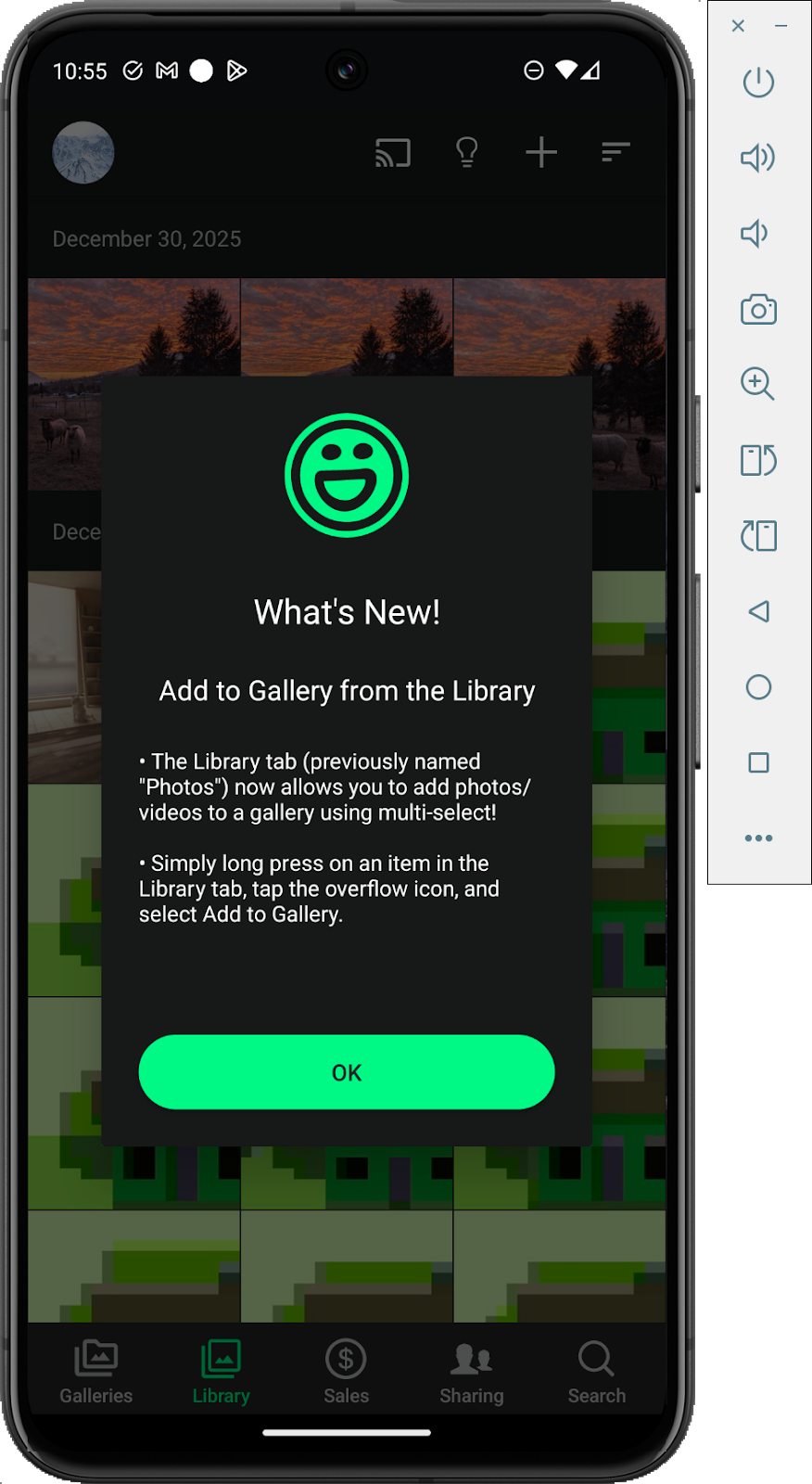
A smoother, more powerful mobile experience awaits. We've refined the Library tab so you can scroll through large collections seamlessly, select images in bulk without interruption, and never lose your place during a background refresh. You now have full control to show or hide Gallery photos directly in the Lightbox, and the Galleries tab features a polished new header that gives your galleries a more professional, consistent look across devices. We've also made it easier to discover and access SmugMug Source for RAW file management right from the upload picker.
Select All/Deselect All in your Android library now works exactly as expected. No more confusing label swaps or unresponsive taps when scrolling through large collections–browsing and managing your photos in bulk is smoother and more reliable than ever.
We cleaned up a timing issue on Android. Auto Upload and Enable Notifications prompts could appear simultaneously, making it unclear which to respond to first. Now prompts appear one at a time, so you can make each decision without the clutter.
We standardized link colors across your Site Settings. Now everything looks cohesive and polished. No more mismatched styling — your settings page now feels as clean and professional as the rest of your experience.
Your HEIC photos now upload without a hitch. We resolved an issue where this popular file format was failing during upload. Whether you're shooting on your iPhone or any device that uses HEIC, your images will flow right into your library as expected.
The download button for individual videos is back. You can once again save your videos directly from your browser, right when you need them.
We updated the "All Visible Galleries" help tooltip in Print Packages. Now, it will accurately reflect that unlisted galleries are included, so you'll have a clearer understanding of exactly which galleries your print package settings apply to.
We added clearer messaging when replacing photos on proof delay orders headed to the lab. You'll now be advised that only JPEG files are accepted for print, so there's no guesswork about which format to use. This saves you time and ensures your orders move to print without a hitch.
We fixed an issue where the Collect feature wasn't actually collecting your selected photos. Your picks now save as expected, so you can curate your favorites with confidence knowing every selection counts.
We rapidly resolved an urgent upload processing issue. A processing bottleneck created a significant queue buildup and slowed things down across the board, but our team jumped on it fast, cleared the backlog, and got your uploads moving at full speed again.
%201.jpg)